
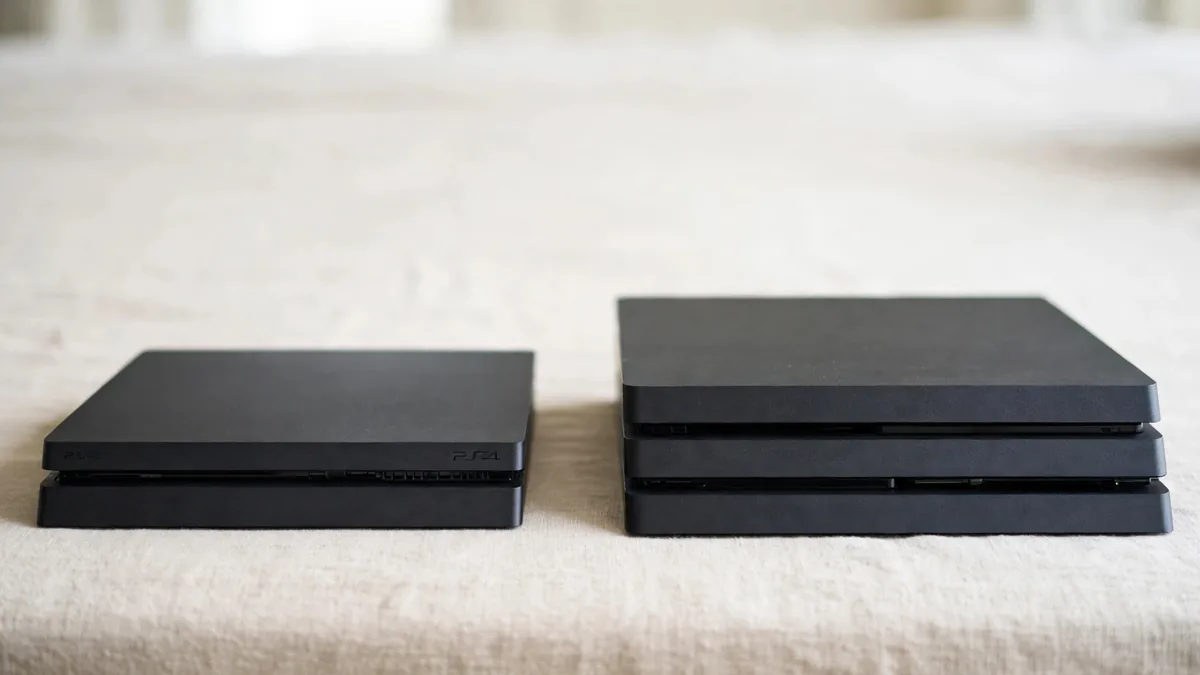
A PS4 Slim vs PS4 Pro comparison is easier if you start with the television you already own and the games you can actually buy for it. If you want a second-hand console for an ordinary 1080p screen and occasional local matches, a well-kept Slim can be good value. A Pro is worth trying if a game you play benefits from its extra performance or you want to use a 4K display. In either case, an older console's condition can matter more than the badge on the case.
Take the names of two or three games you expect to play to the seller. Ask to see at least one running past the opening menu.
Decide what the TV and game can show together
The PS4 Pro supports 4K output on a compatible setup. That doesn't mean every game renders at native 4K or runs at the same frame rate. Check the specific title for its Pro enhancements and any graphics settings it offers. If a game has a choice between visual detail and smoother play, try the option you would keep at home.
A 1080p display doesn't rule out a Pro. Some game-specific enhancements can still be useful at that resolution. Sony's PS4 Pro Boost Mode guidance explains that the setting may improve frame rate in some older titles. Check your game rather than assuming the improvement applies to the whole library. If your priority is a football game with friends and both units feel the same in that game, the Slim may already meet the need.
For a 4K television, confirm the console and television recognise the intended output over a suitable connection. Compare a moving scene from your normal seat, not only a still menu close up. You may notice smoother camera movement more than a small change in distant detail.
If the shop uses a different screen, ask which output it is showing before deciding the Pro looks better.
Judge fan noise by playing the same game
Ask the seller to show the console starting when cold, then play long enough for it to warm up. Use the same title on the Slim and Pro if possible. A fan changing speed during play can be normal. A rattle, shutdown or overheating warning needs investigation. Check that the console has space around its vents during the demo. If you're putting it in a TV cabinet at home, make sure the shelf allows airflow.
Ask whether the machine was opened and what work was done. A seller may have had it cleaned or repaired. If they mention a replaced fan or drive, check the repair record and how the console behaves now. A neat case or a quiet first minute can't establish whether the console is sound under load.
The used PS4 inspection guide covers the separate checks for disc reading, controller drift and network access. Apply those to whichever model you prefer. A Pro with a suspect drive is a weak purchase if most of your games are on disc.
Compare storage from the settings screen
Don't assume the installed drive matches the label on the box. Open Settings and look at Storage. Ask whether the internal drive has been changed and whether an advertised capacity includes a separate external device. If the seller quotes a bundle with external storage, get the drive's details and try it before including it in your comparison.
Watch a game load or begin copying from a clean disc. Repeated errors, long unexplained hangs or warnings about corrupted data matter more than a large capacity figure. If the console works and space is the only issue, compare the cost of adding compatible storage with the price difference between two ready-to-use units.
Consider how many games actually need to remain installed. A household that plays the same two titles every week may not need the capacity someone with a large rotating library values. Buy for the way you use the console rather than a theoretical number of games.
Put the whole package against your budget
Compare the included controller, cables and games. Test the pad wirelessly and price a replacement if it drifts or fails to charge. Ask what written terms apply if the machine overheats or the drive stops reading. A cheaper Slim that includes a reliable pad can be more useful than a bare Pro. If both are in comparable condition and you notice a meaningful improvement in your usual games, decide whether that is worth the extra cost.
See the PS4 price guide for Lahore for the wider market factors. Then browse MacVault's PS4 selection and confirm today's price for the exact unit and accessories. If you have a firm spending limit, leave enough to buy the games and controller you need to use the console on the first evening.
Frequently asked questions
Does PS4 Pro improve every game on a 1080p screen?
Benefits depend on the game and its modes. Check the titles you play and compare them directly before paying extra.
Should I buy the Pro if my TV is 4K?
Try the relevant game and confirm the console works with your display setup. If the improvement is small for the way you play, condition and accessories may matter more.
What should I compare if one unit has a larger drive?
Check whether the quoted storage is internal or external and test how the drive behaves. Price the extra capacity separately from the condition of the console.
Business: MacVault
Price Range: Expected price ranges confirmed before purchase
Phone: +92 339 4004289
Description: Browse iPhones, MacBooks, iPads, Apple Watch, AirPods, and PS5 products from MacVault in Lahore with clear condition, warranty, and stock details.
+92 339 4004289 <contact@macvault.store>