
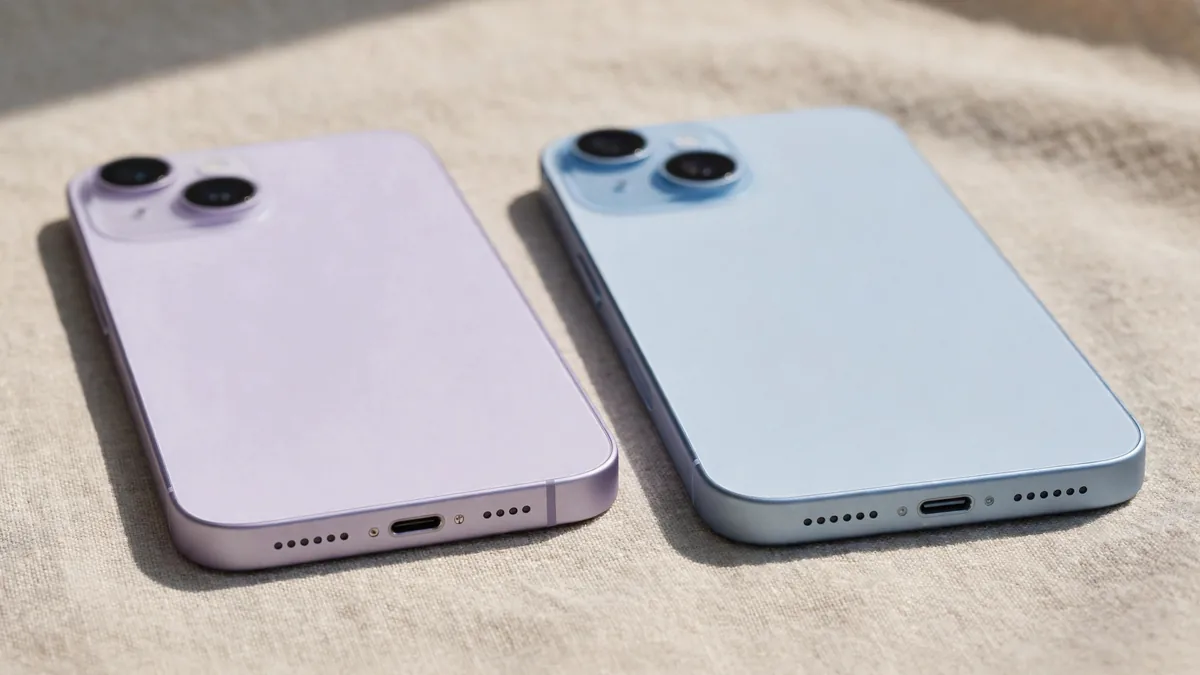
On the used market in Lahore, the iPhone 14 vs iPhone 15 decision is one of the most common. Both are 6.1-inch phones with 6GB of RAM, both run iOS 26, and from a distance they look almost the same. Yet the 15 brings three changes that you notice every day: the Dynamic Island, a 48MP main camera and a USB-C port.
Whether those changes are worth the extra money depends on the gap between two real units, not between two launch prices. This guide sets out the differences that matter, then shows how to compare the quotes in front of you.
What actually changed from the 14 to the 15
Here is the short list for the standard models, based on Apple's specifications:
- Chip: iPhone 14 uses the A15 Bionic; iPhone 15 uses the A16 Bionic, the chip from the 14 Pro.
- Display top: the 14 has a notch; the 15 has the Dynamic Island.
- Brightness: the 15's display gets noticeably brighter outdoors in direct sun.
- Main camera: 12MP on the 14; 48MP on the 15, with a 2x option cropped from the sensor.
- Port: Lightning on the 14; USB-C on the 15.
- Design: the 15 has colour-infused frosted back glass and slightly rounded edges.
Things that stay the same are just as useful to know. Both have the same screen size, the same 60Hz refresh rate, Face ID, Crash Detection and the same Ultra Wide camera resolution. Apple quotes similar video playback figures for both. Neither standard model supports Apple Intelligence, so do not let a seller use that as a reason to pay more for the 15.
Dynamic Island: more useful than it sounds
The Dynamic Island turns the cut-out at the top of the screen into a small live display. A running timer, an incoming Careem ride, a call in progress or music playback sit there while you use other apps. It is not essential, but after a week many people find going back to a notch feels dated.
Try it in the shop. Start a timer, open WhatsApp and see whether the live activity at the top is something you would glance at. If it does not interest you, the 14's notch costs you nothing functional.
USB-C on the iPhone 15 and what it changes at home
For many families, the USB-C iPhone is the strongest practical reason to choose the 15. One cable can charge the phone, a MacBook, an iPad and many Android phones in the same house. When you lose a cable at the office or in a car, borrowing one is easier.
The 15's USB-C port transfers data at USB 2 speed, similar to Lightning, so do not expect faster file copying on the standard model. The benefit is convenience, not speed. If you already own several good Lightning cables and a Lightning car charger, the 14 may fit your current setup with no extra spending. Our USB-C vs Lightning guide explains which accessories carry over.
Camera: the 48MP sensor makes a real difference
The 15's 48MP main camera captures more detail by default and gives an optical-quality 2x option for portraits and shots across a room. Photos of food, products and family gatherings hold detail better when you crop. Portrait mode on the 15 can also capture depth information automatically, so you can turn a normal photo into a portrait later.
The 14 still takes good photos in daylight and handles video well. If you mostly share pictures on WhatsApp and Instagram, the difference narrows once images are compressed. If you sell products online, photograph events or simply like zooming into pictures later, the 15 is the better tool. In low light both phones do a solid job; compare the same indoor shot on both units if you can.
Battery: compare condition before specifications
On paper, the 15 has a slightly larger battery and a more efficient chip, and Apple's endurance figures are close. In the used market, battery health matters far more than the spec sheet. A 14 at high battery health can outlast a 15 that has been charged hard in a Lahore summer.
Check Settings > Battery > Battery Health & Charging on both phones. The 15 also shows cycle count and manufacture date under Settings > General > About, which helps you judge how hard it has been used. Our battery health check guide explains what numbers to accept. If a 14 has a low battery figure, factor in the cost of a battery replacement before comparing.
Weighing the used price gap in Lahore
When you collect quotes for the iPhone 15 price in Pakistan and the iPhone 14 price in Pakistan, line them up carefully:
- Same PTA status. A PTA approved 14 and a non-PTA 15 are not comparable. Registration status changes both price and usefulness.
- Same storage. Both start at 128GB; compare like with like.
- Similar battery health and condition. Note scratches, replaced parts and any unknown-part messages.
- Same box and accessories. A boxed unit with a cable carries a different value from a bare phone.
- Quotes from the same day. Prices move with the dollar rate and new launches.
Once the comparison is fair, ask yourself what the gap buys. If the 15 costs a modest amount more, the USB-C port, better camera and newer chip that will stay supported longer usually justify it. If the gap is large, a clean 14 with good battery health is a sensible way to keep money aside for a case, a charger or iCloud storage.
Software support matters too. Apple has a long record of updating iPhones for years, and the 15 is a year newer, so it should receive updates for longer. That counts most for buyers who keep phones for four or five years.
Who should pick which
- Pick the iPhone 14 if the price gap is wide, you already own Lightning accessories, and you mainly use calls, WhatsApp and social media.
- Pick the iPhone 15 if you want one cable for everything, care about photo detail, or plan to keep the phone for a long time.
If you are weighing a step further up or down, read iPhone 13 vs iPhone 14 or iPhone 15 vs iPhone 16 for the neighbouring comparisons.
Frequently asked questions
Is the iPhone 15 faster than the iPhone 14 in daily use?
The A16 in the 15 is newer than the A15 in the 14, but for messaging, browsing and social media both feel quick. The difference shows more in heavy games, long video recording and over years of software updates.
Can I use my old Lightning accessories with an iPhone 15?
Not directly. You need USB-C cables, or an adapter for wired accessories that use Lightning. Wireless chargers and MagSafe accessories work with both phones.
Do the iPhone 14 and 15 have the same screen?
Both are 6.1-inch Super Retina XDR displays at 60Hz. The 15 adds the Dynamic Island and reaches higher brightness outdoors, which helps in strong sunlight.
Next step
Browse current units on the MacVault iPhone page, where listings show PTA status, storage and battery information when available. Message MacVault on WhatsApp with "iPhone 14 or 15" and your preferred storage, and ask for today's prices and photos of both units. If you switch to USB-C, matching cables are on the cables page.
Business: MacVault
Price Range: Expected price ranges confirmed before purchase
Phone: +92 339 4004289
Description: Browse iPhones, MacBooks, iPads, Apple Watch, AirPods, and PS5 products from MacVault in Lahore with clear condition, warranty, and stock details.
+92 339 4004289 <contact@macvault.store>