
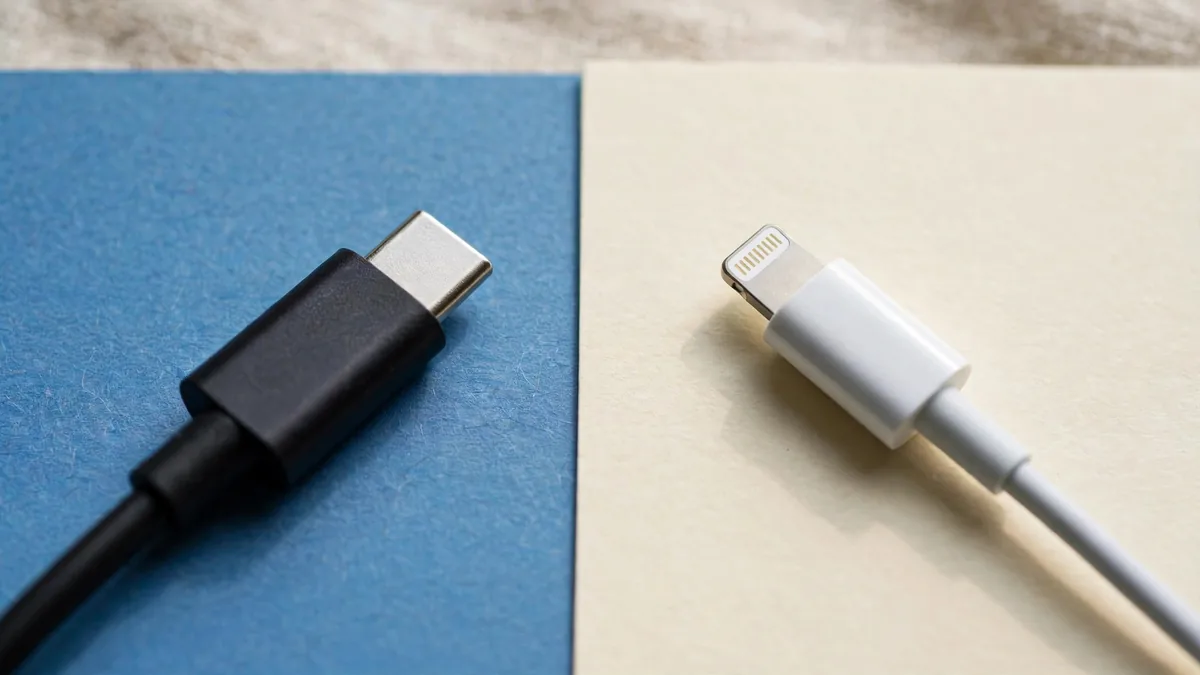
The USB-C vs Lightning question comes up the moment someone in a household upgrades. One person moves to a newer iPhone, the drawer of old cables suddenly stops fitting, and the car charger, the bedside cable and the power bank all need rethinking. The good news is that the switch is easier than it looks once you know which phone has which port and what each cable can actually do.
If you're searching for USB C vs Lightning to replace a cable, check both ends first. The connector on the phone decides what fits it, and the socket on your charger or car decides what fits the other end.
Which iPhone has USB-C and which has Lightning
The split is simple, because Apple changed the port in one generation.
- Lightning: every iPhone from the iPhone 5 up to the iPhone 14 series, including the iPhone SE (2nd and 3rd generation), iPhone 12, 13 and 14 families.
- USB-C: the iPhone 15 series onward. That includes iPhone 15, 15 Plus, 15 Pro and 15 Pro Max, the whole iPhone 16 family and the 16e, and the iPhone 17, 17 Pro, 17 Pro Max and iPhone Air.
So if someone asks which iPhone has USB-C, the short answer is anything from the 15 onward. When buying used, do not rely on a listing title. Look at the port, then confirm the model name in Settings > General > About. A Lightning port on a phone sold as a "15" means the listing is wrong.
Charging: mostly the same, with better flexibility
For everyday charging, the port shape matters less than the adapter and cable behind it. Both Lightning and USB-C iPhones can fast charge with a suitable USB-C power adapter. With Lightning, that means a USB-C to Lightning cable. With a USB-C iPhone, it means a USB-C to USB-C cable.
The practical win with USB-C is fewer cable types. The same USB-C charger and cable can serve a USB-C iPhone, a recent iPad, a MacBook, newer AirPods cases and many Android phones in the house. On a USB-C iPhone you can also plug in a cable to top up small accessories such as AirPods from the phone itself, which helps on a long trip.
What has not changed is quality. A poorly made cable can charge slowly, heat up or fail early whether it ends in Lightning or USB-C. Our guides to the original iPhone charger and the original iPhone cable explain how to spot weak copies in Lahore markets.
Data speed: where USB-C iPhones differ from each other
This is the part most buyers miss. Lightning moves data at USB 2 speed. Many USB-C iPhones also run at USB 2 speed, so the base models do not copy files faster just because the plug changed.
The Pro models are different. The iPhone 15 Pro, 15 Pro Max, 16 Pro and 16 Pro Max support USB 3 transfers of up to 10Gbps, and Apple lists USB 3 support for the 17 Pro models too. To get that speed you need a cable rated for USB 3. The USB-C cable in the box charges well, but it transfers at USB 2 speed. If you shoot long 4K or ProRes clips and move them to a Mac or an external drive, buying a proper USB 3 cable is worth it. If you mostly back up to iCloud, it makes no difference to you.
Check Apple's tech specs page for your exact model on apple.com before paying extra for a fast cable.
Adapters: which ones help and which ones disappoint
Moving to USB-C does not mean throwing everything away.
- USB-C to Lightning adapter: Apple sells a small adapter that lets Lightning accessories plug into a USB-C iPhone. It is useful for a Lightning-only car kit or older wired accessories you still like. It is often marketed by sellers as a lightning to usb c adapter, so read the description carefully to see which end goes into the phone.
- Old USB-A chargers: an old wall brick with a USB-A port still works with a USB-A to USB-C cable, but charging will be slower than with a modern USB-C adapter.
- Wired earphones: Lightning EarPods will not plug straight into a USB-C iPhone. Either use the adapter or move to USB-C EarPods.
Avoid cheap no-name adapters for charging. A loose or poorly built adapter can make the connection drop in and out, which is irritating in a car and bad for long-term reliability.
How to plan your cables when you switch
Rather than buying cables one at a time as things fail, take five minutes and plan the move.
- List where you charge. Bedside, office desk, car, bag and power bank are the usual five.
- Mark which devices still use Lightning. An older iPad, AirPods with a Lightning case or a family member's iPhone 13 may keep Lightning around for years.
- Decide on one charger standard. A good USB-C power adapter covers almost everything new. If you still need Lightning, keep a USB-C to Lightning cable at one or two spots instead of everywhere.
- Buy at least one good USB-C cable. One USB-C iPhone cable of decent quality at the bedside and one in your bag cover most days.
- Check the power bank. If it only has a USB-A output and a Lightning input, it may be time to replace it. Our power bank guide lists what to look for.
Plan for load-shedding too. If your evening charging happens on a UPS or power bank, a USB-C power bank with a USB-C output can top up phone, AirPods and an iPad from one cable type.
Frequently asked questions
Can I use my old Lightning cable with an iPhone 16?
Not directly. The iPhone 16 has a USB-C port, so you need a USB-C cable or Apple's USB-C to Lightning adapter if you want to keep a Lightning accessory in use.
Does USB-C make every new iPhone charge faster?
No. Charging speed depends mainly on the power adapter and cable. A Lightning iPhone on a good USB-C adapter can still fast charge, and a USB-C iPhone on a weak brick will charge slowly.
Do I need a special cable for fast file transfers?
Only on the Pro models that support USB 3, and only if you move large files by cable. The cable in the box works at USB 2 speed, so buy a USB 3 rated cable if transfer speed matters to you.
Will my Android USB-C charger work with a USB-C iPhone?
Usually yes, as long as it is a good-quality USB-C charger. The phone will take what it can safely use. Avoid unbranded chargers that run hot.
Ready to sort your setup? Browse MacVault cables and accessories, then message us on WhatsApp with your iPhone model so we can confirm which cable or adapter fits before you buy.
Business: MacVault
Price Range: Expected price ranges confirmed before purchase
Phone: +92 339 4004289
Description: Browse iPhones, MacBooks, iPads, Apple Watch, AirPods, and PS5 products from MacVault in Lahore with clear condition, warranty, and stock details.
+92 339 4004289 <contact@macvault.store>