
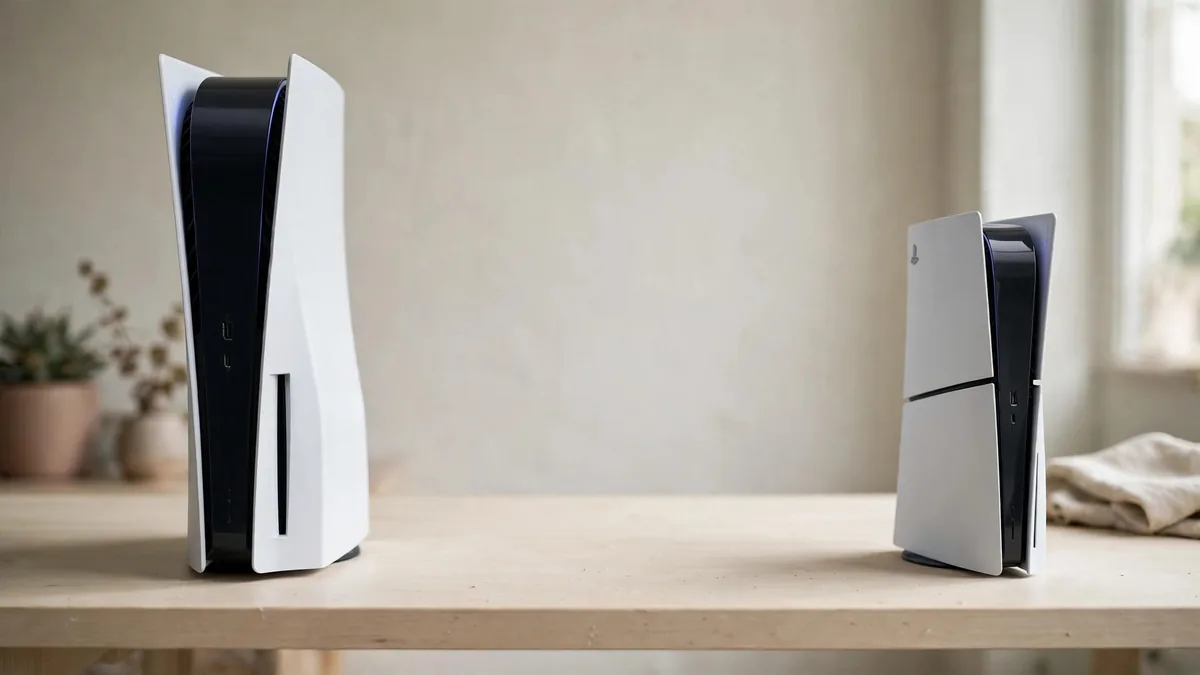
For a used buyer weighing PS5 vs PS5 Slim, start by measuring the shelf where the console will sit and looking at how you get your games. The Slim can be easier to place and gives some buyers a way to add a disc drive later. An original PS5 that runs well and already has the drive you need can still be a sensible buy. Check the model, actual storage and condition before deciding how much the smaller body is worth.
This comparison covers the original and Slim PS5 families. Ask sellers for the model identifier so you know which hardware and package they mean.
Measure the shelf after leaving room for cables and air
Sony introduced the smaller PS5 design with a more compact body. Test your shelf with space for cables and ventilation. A console can fit on paper and still sit too close to the wall once an HDMI lead is attached. If your only space is a tight cabinet, measure an open shelf as well before assuming the smaller model solves the placement problem.
Check how you will position it. The original package uses its model-specific base. A Slim package uses its appropriate feet for horizontal placement, and upright positioning can require a separate compatible stand. Ask the seller to show which pieces are included and how the unit sits with them attached. A missing stand or foot can add cost, particularly if the seller is using a shop display that doesn't go home with you.
Check front ports before buying if you connect a particular accessory regularly. The original has front USB-A and USB-C connections, while the Slim design has two front USB-C ports. Confirm the exact console and cable you intend to use. A port you need every time you pair a controller is a more useful comparison than a connection you seldom touch.
Check storage from the console rather than the listing
Sony announced the Slim with a 1TB drive, while the launch PS5 came with a smaller advertised capacity. Later Slim offers can vary by model and region, so read the exact label and check Settings, Storage during a used inspection. Advertised capacity and space available for games are also different figures. See what is free after allowing for system use and any content already installed.
Ask whether the quoted storage includes an added M.2 drive. If it does, have the seller show the separate storage entry and demonstrate a game running from it. Check which drive is included in writing. If you need more space later, read the PS5 storage upgrade guide before treating a larger drive as part of the cost of every console.
If you mainly play two games, compare how much room they use and how often you download something else. A sound launch unit with enough room for those titles can be a better fit than paying for capacity you won't use. If your household keeps several games ready at once, include that in the comparison.
Decide whether the drive must be in the box
On the original generation, choose a drive-equipped unit if you need discs. The original Digital Edition can't take Sony's add-on drive. The supported Slim Digital models can take a compatible detachable drive, which needs an internet connection during initial pairing. Read Sony's drive setup guidance and verify the model number before buying a console on the assumption you can convert it later.
If a used Slim already has a drive attached, ask the seller to show it recognising, launching and ejecting a working disc. Get the drive on the receipt. If you are deciding between buying the drive now and buying it later, compare the total cost with an original disc model and a complete Slim package. The Digital versus Disc Edition guide covers the game-buying trade-offs.
Give an older launch unit a fair but thorough inspection
On both designs, check for stable HDMI output, a working controller and access to PlayStation Network. On a launch-era unit, allow time to test after it warms up and ask whether it has been repaired. Inspect the sockets and included cables. A newer chassis in poor condition can be a worse purchase than an older console that passes the test.
Ask how the console was stored and transported. If a cover sits unevenly or a cable is loose, check the underlying connection rather than counting it as a cosmetic issue.
Use the used PS5 inspection guide at the handover. Then check MacVault's PS5 selection and confirm today's price for the exact hardware, drive, storage and controller you need. Compare the packages after pricing anything missing. If both play your games well, choose based on shelf fit, condition and the features you will actually use.
Frequently asked questions
Will a Slim run a different library from the original PS5?
Both are PS5 consoles. Compare the games you can access, including whether a disc requires a working drive, rather than treating Slim as a different console generation.
Can every Slim be fitted with a drive?
Check Sony's supported model groups and the exact hardware. If you're buying a digital unit, verify compatibility before budgeting for a later drive.
Is an original PS5 worth buying if it is much cheaper?
Test it through a game, check the drive and online access you need, and include missing accessories in the price. Judge the actual unit alongside a comparable Slim.
Business: MacVault
Price Range: Expected price ranges confirmed before purchase
Phone: +92 339 4004289
Description: Browse iPhones, MacBooks, iPads, Apple Watch, AirPods, and PS5 products from MacVault in Lahore with clear condition, warranty, and stock details.
+92 339 4004289 <contact@macvault.store>