
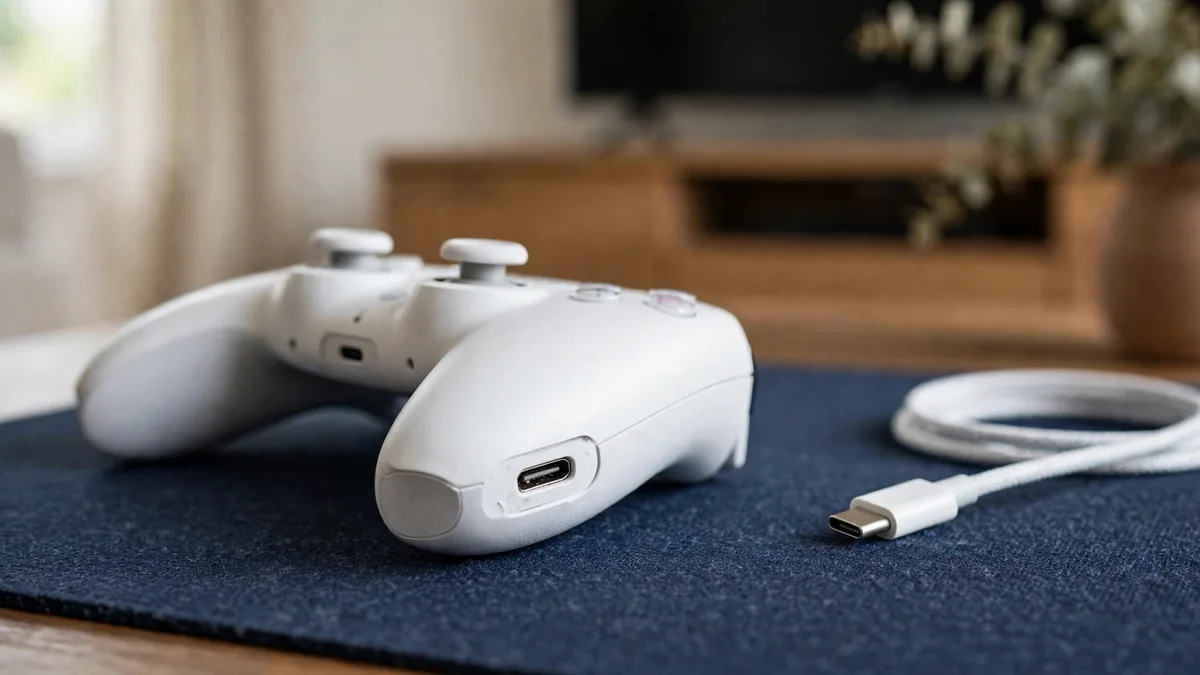
A PS5 controller not connecting usually shows one of three symptoms: the light bar blinks and then goes dark, the pad works only while the cable is plugged in, or the console simply ignores the PS button. Each points somewhere different. A blinking light that never settles is a pairing problem. A pad that only works wired often has a Bluetooth or settings issue. A pad that shows no light at all may have a flat battery or a charging fault.
Work through the fixes below in order. Most of them take a minute, need nothing more than a cable and a pin, and don't void anything. Only move to repair or replacement once the cheap steps have been ruled out.
Start with the cable, not the menus
The DualSense pairs with a PS5 by cable. Turn the console on, connect the controller to a front USB port with a USB-C cable that carries data, and press the PS button. The light bar should flash and then stay lit in your player colour. Once that happens, unplug the cable and test whether it stays connected wirelessly.
The cable matters more than people expect. Many cheap USB-C cables sold for phone charging carry power but no data. The controller will charge from one, but the console can't see it, so pairing never starts. If nothing happens, try the cable that came in the PS5 box, or another one you know moves data, such as one from our PlayStation cables section.
Also try a different USB port on the console. A port packed with dust, or one that was bent by a cable yanked out at an angle, can fail on its own while the others work.
If the pad has been dead for weeks, leave it on the cable for a while before pressing anything. A fully drained battery may need some charging time before the light bar responds at all.
Use the reset button on the back
When cable pairing fails, reset the controller. Turn the PS5 off completely, not into rest mode. On the back of the DualSense there is a small hole near the PlayStation logo. Push a SIM pin or straightened paper clip into it and hold the button inside for about five seconds. Then reconnect with the cable and press the PS button again.
Sony's DualSense troubleshooting page describes the same process. The reset clears the pairing memory on the pad, so it's especially useful when a controller was previously paired with another console, a phone or a PC. A pad bought second hand often needs this step before it will accept your console.
Clear out wireless interference
If the pad pairs on the cable but drops when you unplug, the wireless link is struggling. Common causes at home:
- The PS5 is inside a closed cabinet or behind a TV and metal wall bracket.
- A Wi-Fi router, phone, wireless speaker or another Bluetooth device sits right next to the console.
- You're playing from much further away than usual, for example from another room.
- The controller is still paired to a phone or laptop nearby that grabs it first.
Move the console into the open for a test and sit closer. Turn off Bluetooth on nearby phones and tablets for a minute. If the drops stop, rearrange the setup rather than buying a new pad.
A handy check is the communication setting. In Settings > Accessories > Controllers, the PS5 lets you choose whether the controller talks over Bluetooth or the USB cable. If someone set it to cable at some point, wireless play won't work until you switch it back.
Update the console and the controller
Out-of-date software can stop features working properly. Update the PS5 first under Settings > System > System Software. Then check for controller firmware in Settings > Accessories > Controllers, where the PS5 offers a wireless controller device software update when one is available. Keep the pad on the cable during the update and don't unplug it until it finishes.
Check the PS5 itself
Sometimes the console, not the pad, is the problem. Try a second controller if you have one, or borrow one from a friend. If the second pad also fails to pair, look at the console: restart it fully, check the USB ports, and try a rebuild of the database from Safe Mode as Sony describes on its support pages.
Also try your problem controller on another PS5 if you can. If it fails there too, the pad is the one to replace or repair.
Signs of a faulty or copy controller
If none of the steps above work, the controller may have a hardware fault. Watch for:
- No light at all after a long charge on a known good cable.
- A USB-C port that feels loose or only charges at a certain angle.
- Charging that stops and starts while the pad sits still.
- Swelling, creaking or a gap opening along the seams, which can point to a battery problem. Stop using it.
Copy pads are a separate risk. Some third-party and imitation controllers look like a DualSense but use their own pairing method, lack features, or stop working after a console update. Signs include a lighter feel, a mismatched or blurry logo, poorly finished touchpad edges, packaging with spelling mistakes, and a price far below the usual market. A genuine DualSense should appear in the PS5 menus as a wireless controller and accept official firmware updates.
Deciding whether to repair or replace
A port replacement or battery replacement can make sense on a pad that is otherwise healthy. If the controller also has stick drift, worn triggers or a weak battery, the combined repair may cost more than it's worth. Our PS5 controller drift guide covers the stick side separately so you can check both before getting a quote.
When comparing replacements, the PS5 controller price in Pakistan depends on whether the pad is new or used, the colour or edition, and whether it comes with a box and seller warranty. Our PS5 controller price guide explains what moves that cost. Ask for the warranty type and duration in writing before paying, and read the MacVault warranty page for how it works on our units.
Frequently asked questions
Why does my PS5 controller only work with the cable plugged in?
The console may be set to use the USB cable for communication, or wireless interference may be dropping the connection. Check the communication method under Accessories in Settings, then test with the console in the open and nearby Bluetooth devices switched off.
Will resetting my DualSense delete anything?
The reset clears the controller's pairing memory, so you need to reconnect it with a cable afterwards. It doesn't touch your games, saves or console settings.
Can a phone charger cable pair a PS5 controller?
Only if the cable carries data. Many cheap charging cables supply power only, so the pad charges but the console never detects it. Use the cable from the PS5 box or another one you know works for data.
How do I know if a second-hand DualSense is genuine?
Pair it with your console by cable, check that it appears as a wireless controller and accepts a firmware update, and test the touchpad, triggers and speaker. Look closely at the logo, seams and finish, and be cautious about pads priced well below the usual market.
Next step
If your pad has passed every check and still won't connect, it's probably time for a replacement. Browse MacVault's PlayStation controllers and message us on WhatsApp to confirm today's price and condition on the exact unit before you buy.
Business: MacVault
Price Range: Expected price ranges confirmed before purchase
Phone: +92 339 4004289
Description: Browse iPhones, MacBooks, iPads, Apple Watch, AirPods, and PS5 products from MacVault in Lahore with clear condition, warranty, and stock details.
+92 339 4004289 <contact@macvault.store>