
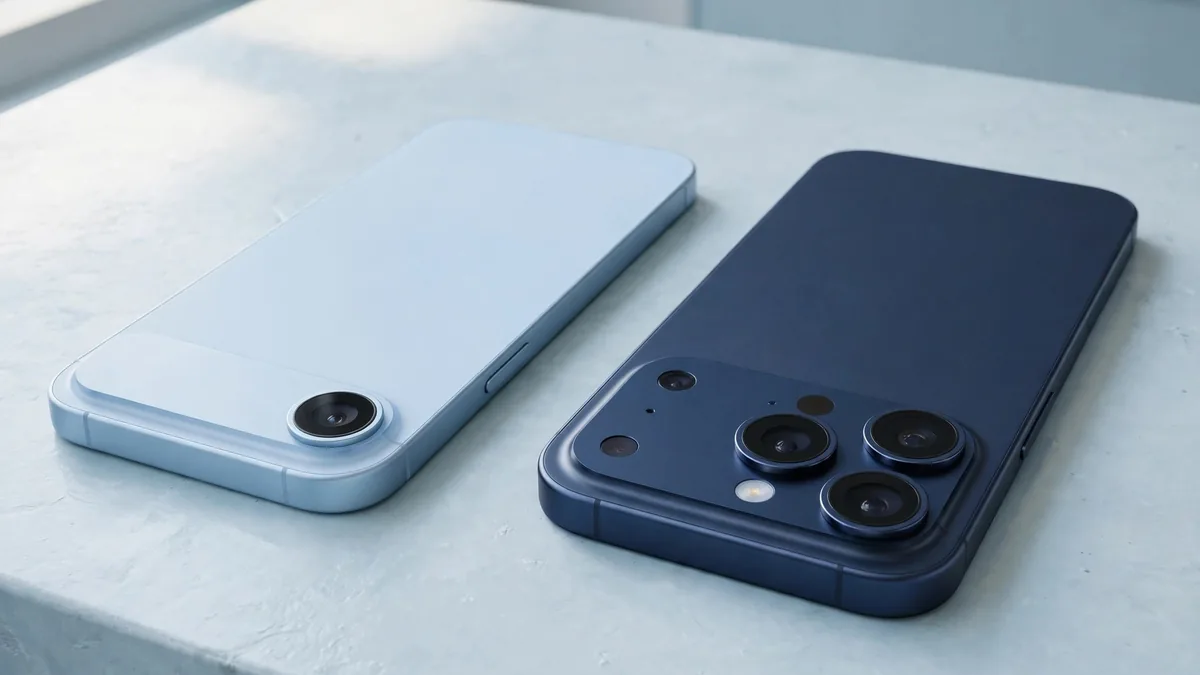
The iPhone Air vs iPhone 17 Pro decision starts with where you notice your phone most. The Air is easier to carry if a bulky phone annoys you on every commute. The 17 Pro makes more sense if you're often filming events from across the room, or if your current phone spends the last part of the day attached to a charger.
Both are from the same 2025 generation. By now, you might be comparing a clean used Air with a 17 Pro that has seen a year of heavy use. Separate the differences between the models from the differences between those two units. An import variant or a replaced part can matter more to your purchase than a feature on the spec sheet.
Try both with the case you'd actually use
Hold each phone in one hand and try a task you repeat every day, such as reading a voice-note transcript while standing or unlocking the phone to scan a code. On a shop counter the Air's thin profile is obvious. With a thick case on, decide whether the advantage is still worth paying for.
Think about where you put the phone between uses. If you carry it in a shirt pocket, weight might make a difference all afternoon. If it lives in a bag beside a power bank, the difference may be less important. Try the case on the exact model before buying it. Check that its edges protect the phone in the way you want without making the buttons awkward.
Check the exact battery before comparing the models
Apple's published video playback ratings favour the 17 Pro, though the figure depends on the market version. Compare the iPhone Air specifications with the iPhone 17 Pro specifications for the UK or Apple's listing for the market you're buying from. Those ratings use controlled tests. Mobile signal, camera use and screen brightness will affect the time you get from a particular phone. If you spend long days out with navigation and video recording, start by looking at the Pro.
For a used example, ask to see battery health in Settings. Compare the condition of the batteries and check the service history before you use runtime as the reason to buy either phone. Look at the used iPhone buyer's guide for an inspection checklist. Try recording a short video and playing it back, then plug in a cable you know works. That won't measure a whole day of battery life, but it can reveal an obvious charging problem.
Take two photos you would struggle to get with your current phone
The Air has a single rear camera. The 17 Pro adds dedicated Ultra Wide and Telephoto cameras alongside its main rear camera. Open the camera on each phone and frame a person-sized object from the far end of the shop. Then stand close to the counter and try to fit several items into one shot. These are quick ways to see whether you'd reach for the extra lenses.
For photos of documents, meals and friends at arm's length, judge the Air on those same subjects. If you take a lot of group photos in tight rooms or film a school performance from the back, try the Pro's other lenses in indoor light. If you're buying used, look at the glass in daylight and make sure the camera can focus on something close and something farther away.
Sort out eSIM before moving your number
The iPhone Air uses eSIM and has no physical SIM tray. If your line is currently on a card, ask your operator whether it can move that line to eSIM and what the activation process involves. Do this before giving up your current phone, especially if it receives codes you need to access your accounts.
The iPhone 17 Pro's SIM setup varies by market. Some versions have a tray and others are eSIM-only. Verify the exact variant from the phone itself and check for carrier lock. Local network registration is a separate question. Check the phone's relevant IMEIs through DIRBS and see the PTA-approved iPhone guide for how to compare offers. If you regularly swap a physical work SIM between devices, make the tray a condition of your shortlist.
Compare prices only after you choose the right variants
Find a pair with storage that fits your needs, similar condition and the same local network status. Ask MacVault for today's quotes on the exact units from the iPhone category. Keep any price difference for a case, battery work or extra storage separate from what the seller is asking for the phone.
Don't let a cheaper listing settle the decision until you know why it's cheaper. A phone with wear around the edges is one thing. A locked import that can't take your line is another. Ask for the repair history and coverage on each, then decide whether the Air's everyday handling or the Pro's extra camera options earn the difference.
Frequently asked questions
Can the iPhone Air use my existing physical SIM?
The Air has no SIM tray. Ask your operator how to activate your number as an eSIM and confirm that the exact phone can use that line.
Is the 17 Pro always the better used buy for battery life?
It has the stronger published rating, but inspect battery health on both phones. Heavy wear or a battery that needs service can change the value of a particular unit.
Does the Air make sense if I rarely zoom?
It can, especially if you prefer carrying a thinner phone. Also try a group shot from close up, since the Pro's wider camera can be useful even if you rarely take distant photos.
Bring the case and mobile line you expect to keep. The phone that feels right and works with both is the one worth pricing seriously.
Business: MacVault
Price Range: Expected price ranges confirmed before purchase
Phone: +92 339 4004289
Description: Browse iPhones, MacBooks, iPads, Apple Watch, AirPods, and PS5 products from MacVault in Lahore with clear condition, warranty, and stock details.
+92 339 4004289 <contact@macvault.store>