
Most buyers check the screen, battery and Face ID on a second-hand phone, then pay without ever making a call. Audio faults are easy to miss in a noisy shop, and they are some of the most annoying to live with: a crackling earpiece, a caller who keeps saying "I can't hear you", or voice notes that sound like they were recorded underwater. A proper used iPhone speaker test takes about five minutes and needs nothing but the phone and a quiet corner.
This guide covers only sound: the earpiece, the loudspeaker, each microphone, real call quality and the clues that point to water damage. It works for any recent model, and it pairs with the battery, camera and Face ID checks you should run on a used iPhone in Lahore anyway.
Know what you are testing
A modern iPhone has more audio parts than people expect:
- Earpiece: the slit at the top of the screen. You hold it to your ear on calls, and on most recent models it also doubles as the second speaker for stereo playback.
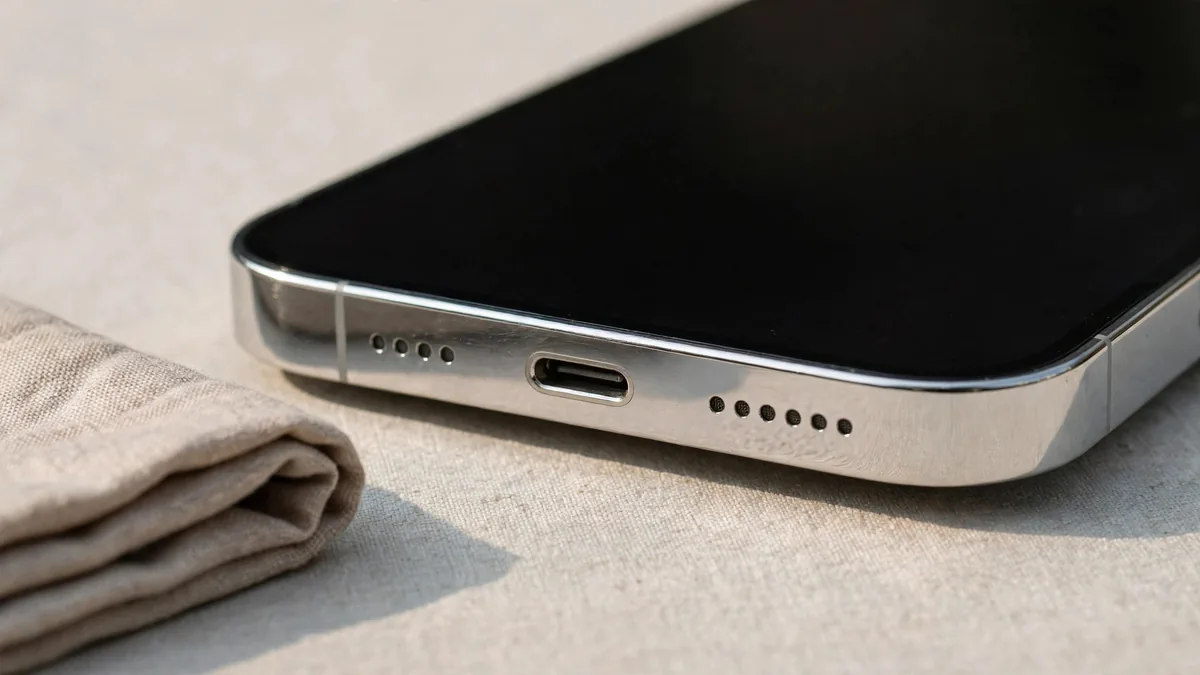
- Bottom loudspeaker: one of the grilles beside the charging port. It handles ringtones, speakerphone and most media.
- Bottom microphone: behind the other grille at the bottom edge. It is the main voice mic for calls and voice memos.
- Front microphone: near the earpiece and front camera, used for selfie video and noise reduction on calls.
- Rear microphone: a tiny hole near the rear cameras, used when recording video with the back camera.
Because each microphone is used in a different situation, a phone can sound perfect on a voice note and still record silent or muffled video. That is why the test below checks each one separately.
Step 1: Loudspeaker and earpiece
Find a spot away from traffic and shop music, then:
- Open Settings > Sounds & Haptics and drag the ringtone volume slider to maximum. The phone plays a preview through the loudspeaker. Listen for rattling, buzzing or a thin, tinny sound at full volume.
- Play a song or a YouTube video at full volume with the phone flat on the counter. Then cover the bottom grille with your finger. If the sound almost disappears, the earpiece is not contributing to stereo playback. On a model that supports stereo, both ends should produce sound.
- Hold the phone landscape and check the sound feels balanced from both ends.
- Lower the volume step by step. Crackling at low volume often means a damaged speaker membrane.
For the earpiece on its own, play a voice memo or make a call and hold the phone to your ear normally. Speech should be clear without having to turn the volume all the way up. A faint earpiece is sometimes just a clogged grille, but you cannot assume that in a shop, so treat it as a fault until proven otherwise.
Step 2: Every microphone, one at a time
This is the iPhone microphone test that catches problems most buyers never notice:
- Bottom mic: open Voice Memos, record yourself speaking for ten seconds at normal distance, then play it back. Your voice should be clear, without hiss or crackle.
- Front mic: open the Camera, switch to the front camera, record a ten-second video while talking, and play it back.
- Rear mic: switch to the back camera, record another short video while talking, and play it back.
- Speakerphone: make a call to a friend or your own second number, switch to speaker, and ask the other person how you sound.
If one of the three recordings is silent, much quieter or muffled compared with the others, that particular microphone has a problem. Also check the phone's microphone access isn't simply switched off for the camera app in Settings > Privacy & Security > Microphone, so you do not blame the hardware for a setting.
Step 3: A real call, not just a recording
Recordings tell you a lot, but a call tests the parts working together, including noise reduction. Make a normal cellular call if the phone has a working SIM, and a WhatsApp call on Wi-Fi either way. Our guide to non PTA iPhones in Lahore explains why a non-approved phone may only manage the WhatsApp test.
During the call:
- Ask the other person whether your voice cuts in and out or sounds distant.
- Move a little noise nearby, such as a running fan, and check whether they can still hear you clearly.
- Hold the phone to your ear and check the screen turns off. If it stays on and your cheek presses buttons, the proximity sensor near the earpiece may be faulty or the screen may be a poor replacement.
- On a supported model, swipe down to Control Center during a call and check the Mic Mode option responds.
Our Face ID guide covers the sensors around the earpiece area in more depth, since screen and earpiece repairs often affect them together.
Step 4: Clues that point to water damage
- Muffled sound that improves when you tap the phone can mean moisture or debris behind the grille.
- Corrosion shows up as green or white residue around the charging port or speaker grilles. Shine your phone torch into them.
- A "Liquid Detected" alert when you plug in a cable means the port has sensed moisture.
- Fogging under the camera glass or around the flash is a strong warning sign.
Ask the seller directly whether the phone has ever been dropped in water or opened for repair, and check Settings > General > About > Parts and Service History for replaced parts. For a full walk-through, read our iPhone water damage check.
What to do if something fails
A faint or crackling speaker is not always a deal-breaker, but it changes the price and the risk:
- A clogged grille may clean up, but do not pay full price on that hope.
- One dead microphone usually means a part replacement and the phone being opened, which raises questions about what else was changed.
- Several audio faults together often point to liquid damage. Walk away unless you are buying it as a repair project.
Frequently asked questions
Can I test the microphones without a SIM card?
Yes. Voice Memos and camera video test all three microphones without a SIM, and a WhatsApp or FaceTime call over Wi-Fi tests call quality. Only the normal cellular call needs a working SIM.
Why is one speaker quieter than the other?
The earpiece is usually a little quieter than the bottom speaker by design. A large difference, or no sound at all from one end during stereo playback, points to a fault or a blocked grille.
Does Parts and Service History show a replaced speaker?
Not always. It reports some replaced parts, depending on the model and iOS version, but you cannot rely on it to list every audio repair. Your own recordings and a call are the more reliable test.
Is a crackling earpiece expensive to fix?
That depends on the model and whether the original part is available. Get a repair quote before buying, and remember that a phone needing repair should be priced well below a clean one.
Before you pay
Run this audio test along with the rest of your checks on any second-hand phone. Browse the iPhone page for units listed with condition notes, then ask MacVault on WhatsApp whether Lahore pickup is available so you can test the exact phone, and read the returns page before you commit.
Business: MacVault
Price Range: Expected price ranges confirmed before purchase
Phone: +92 339 4004289
Description: Browse iPhones, MacBooks, iPads, Apple Watch, AirPods, and PS5 products from MacVault in Lahore with clear condition, warranty, and stock details.
+92 339 4004289 <contact@macvault.store>