
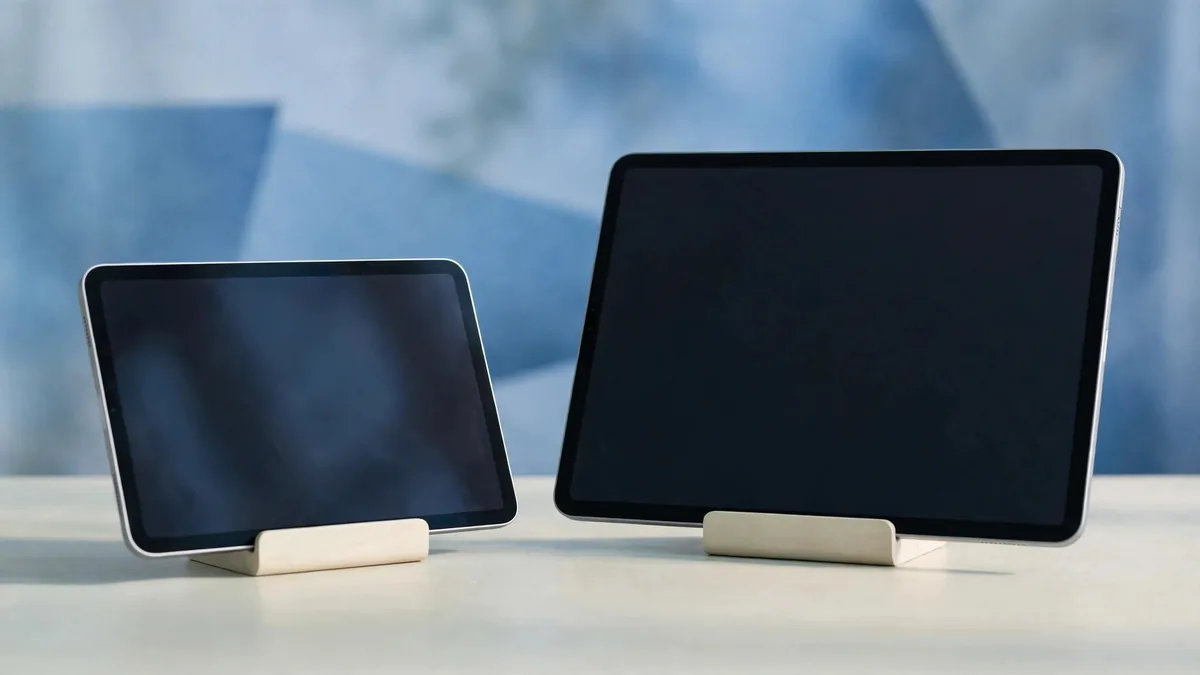
The iPad 11 inch vs 13 inch choice now applies to both the iPad Air and the iPad Pro, and inside each family the two sizes run the same chip. That makes size the main decision rather than a side effect of picking a model. Get it wrong and you end up with a tablet that feels too heavy for the sofa or too cramped for the work you bought it for.
This guide sticks to the size question. If you are still choosing between Air and Pro, settle that first with our iPad Air vs iPad Pro comparison, then come back here.
How the two sizes really differ
Apple's current iPad Air with M4 and iPad Pro with M5 both come in 11-inch and 13-inch versions. Within each line the larger model has the same processor and features, so the bigger screen is not a performance upgrade. What changes is:
- Screen area. A 13-inch iPad gives noticeably more room for two apps side by side, a full A4-style page or a bigger canvas.
- Weight and footprint. The 13-inch models are well over 100 grams heavier and much wider. Check Apple's tech specs page for the exact figure of the model you are looking at.
- Accessory size. Keyboards, cases and folios are made for one size only, and the larger ones usually cost more.
- Price. The larger screen costs more at the same storage, and the gap carries into the used market.
Older models matter too. Before 2024 the large size was sold as 12.9-inch, and those used iPad Pros still show up in Lahore. A 12.9-inch iPad will not fit a case or keyboard made for the current 13-inch models, so check the exact model number before buying accessories.
Carrying it around Lahore
Think about where the iPad will spend most of its day.
If it goes into a university bag with a laptop and books, the 11-inch is easier. It fits small backpacks and one-hand holding on a bus or in a rickshaw. Reading on a 13-inch in bed or while lying on a sofa is fine on a stand but tiring in the hands after a while.
If it mostly lives on a desk and travels in a laptop bag, the 13-inch stops feeling big quickly. Owners who use it as their main computer with a keyboard rarely wish it were smaller.
A quick test: hold each size in one hand in portrait for a minute, the way you would read a long article. Then put it in the bag you actually use. If you have to think about where it fits, that answer counts.
Split screen, documents and study
The larger iPad pays off most when two things are open at once. With two apps side by side on an 11-inch screen, each app gets roughly phone-plus width. That is fine for chat beside a browser, but a PDF next to notes feels tight. On 13 inches, both halves are usable for real reading and writing.
Choose the 13-inch if you will regularly:
- Read lecture slides or PDFs while writing notes alongside.
- Edit documents or spreadsheets with an external keyboard.
- Run video calls with a document open next to the call.
- Use the iPad as a second screen for a Mac, where extra area is the whole point.
Choose the 11-inch if most use is one app at a time: reading, streaming, notes, social apps and the occasional game.
Drawing and design space
For artists, size is about arm movement and canvas room. A 13-inch screen lets you draw with longer strokes and keep tool palettes open without covering the work. Many illustrators and architecture students prefer it for that reason.
The 11-inch has its own advantage: it is easier to hold on your lap or at an angle, the way you might hold a sketchbook. If you draw on the move, or you mainly sketch, take notes and annotate, the smaller one can be the more comfortable tool.
Whichever you pick, check pencil support before paying. The current Air and Pro work with Apple Pencil Pro and Apple Pencil (USB-C), but older Apple Pencil models may not pair. Our iPad for drawing guide covers which pencil goes with which iPad.
Keyboard and case costs by size
Accessories change the true cost of each size more than people expect.
- Magic Keyboard. Apple makes separate keyboards for the iPad Air and the iPad Pro, in 11-inch and 13-inch sizes. The 13-inch versions cost more, and a keyboard for one model line does not fit the other.
- Cases and folios. Good third-party cases for the 13-inch are less common in local shops, so you may wait longer or pay more for the one you want.
- Bags and sleeves. A 13-inch iPad with a keyboard is close to a small laptop in size. Check it fits your bag before assuming you can skip a sleeve.
Add accessories to the comparison from the start. A cheaper 11-inch Air plus a keyboard can cost less than you expected, while a 13-inch Pro with Apple's keyboard and pencil quickly becomes a laptop-level purchase. Browse iPad accessories when you are pricing the full kit.
Price and resale in Pakistan
Local prices move with the dollar, PTA status for cellular models and stock, so confirm today's figure before you compare. What usually stays true:
- At the same storage and model, the 13-inch costs more new.
- The 11-inch tends to sell faster on the used market, because more buyers are looking for it.
- A 13-inch Pro in good condition holds value well with buyers who specifically want a large screen, but there are fewer of them, so expect to wait longer for the right offer.
- Storage matters too. A 13-inch with the minimum storage can be harder to resell than an 11-inch with a sensible amount.
If you are buying used, ask for battery health information where available, check the screen edges for pressure marks, and confirm the model number matches the size you were promised. Our used iPad buying guide covers the full checklist.
Frequently asked questions
Is the 13-inch iPad faster than the 11-inch?
No, not within the same model line. The 11-inch and 13-inch iPad Air share a chip, and so do the two iPad Pro sizes. You pay for screen area, not extra speed.
Is the 13-inch iPad too big to hold?
For short sessions most people manage, but long reading sessions in the hand are tiring. If you mostly use it flat on a desk or on a stand, the size is rarely a problem.
Can I use a 12.9-inch iPad Pro case on a 13-inch iPad Pro?
Usually not. The newer 13-inch models have different dimensions and camera placement. Buy accessories listed for your exact model.
Which size is better for students?
The 11-inch suits students who carry it all day and mainly read and take notes. The 13-inch suits students who need split screen, large PDFs, drawing or a laptop replacement.
When you have picked a size, browse the MacVault iPad page and message on WhatsApp with the model, size and storage you want to confirm current stock and photos of the exact unit.
Business: MacVault
Price Range: Expected price ranges confirmed before purchase
Phone: +92 339 4004289
Description: Browse iPhones, MacBooks, iPads, Apple Watch, AirPods, and PS5 products from MacVault in Lahore with clear condition, warranty, and stock details.
+92 339 4004289 <contact@macvault.store>